Team leader by day. Builder the rest of the time.

Hi, I’m Bradley.

I like building things that make life easier for real people: a website for a country church, phonics practice for my wife’s classroom, the little server that runs my house, and a product that now has paying clients.

This is where those projects live, along with the odd experiments and the lessons they left behind.

I guess you could call this a résumé.

Bradley against an old brick wall, hands in his pockets, in a patterned button-down with a team leader name tag.
Hands in pockets: the international pose for “I don’t know what to do with my hands.”
Don’t like my face? I brought backups · my pick
Where most of my spare time goes currently
AgentAviary · live with private clients
Usually tinkering with
A Raspberry Pi that never sleeps
My time
US Central Time

Where it started

It started at an eighth-grade science fair.

No baking soda volcano for me. My eighth-grade science fair project was a website: a gaming site with its own community message board, built in PHP with a MySQL database behind it.

When the judges started asking how it worked, I started explaining: how a PHP page opens a connection to a MySQL database, runs a query, and turns the rows that come back into the HTML on your screen. How members, threads and posts each live in their own table and point at each other by ID. I still remember their faces. Those were not words they expected to hear from a 12-year-old.

There was no AI to ask and no framework to lean on. Every page, every table, every query and every bit of back-end configuration was typed by hand, broken by hand and fixed by hand. That’s where I learned to read code before I trust it.

Work took me through medical records, IT support, management and frontline leadership after that. The habit stuck the whole way: I like knowing how the thing works, not just that it works.

How a reply got from a keyboard to the board

Built by hand · no AI · no framework

  1. 01BrowserA member types a reply. A plain HTML form POSTs it to the server.<form method="post">
  2. 02PHPChecks the session, validates and escapes the input, builds the SQL.session_start();
  3. 03MySQLINSERT the post, then SELECT the thread back, joined to its members.INSERT INTO posts …
  4. 04HTML outPHP loops the rows into table markup and echoes the finished page.echo '<tr>…';

Three tables, keys by hand

members
idPK
usernameunique
joineddate
threads
idPK
member_id→ members
titletext
posts
idPK
thread_id→ threads
member_id→ members
bodytext

By hand, all of it

  • Every page in hand-written PHP and HTML
  • Every table, key and query in hand-written SQL
  • Back-end configuration, edited by hand
  • Debugging by reading the code. And hitting refresh. A lot.
thread.phpthe old way
<?phpsession_start();include 'config.php';   // mysql_connect() + mysql_select_db() $thread = (int) $_GET['id'];   // never trust the URL$sql = "SELECT p.body, p.posted_at, m.username          FROM posts p          JOIN members m ON m.id = p.member_id         WHERE p.thread_id = $thread         ORDER BY p.posted_at";$result = mysql_query($sql); while ($row = mysql_fetch_assoc($result)) {  echo '<tr><td>' . htmlspecialchars($row['username']) . '</td>';  echo '<td>' . nl2br(htmlspecialchars($row['body'])) . '</td></tr>';}?>
That site is long gone. This is the general shape of how it worked, written the way PHP looked back then.

Selected work

Real builds, for real people.

Each one started with somebody’s actual problem. Here is what it was, what I did with my own hands, where it stands now, and what I’d tell myself next time.

Live · Closed source · Private clients only

AgentAviary

A workspace for coordinating AI agents, and the first product I’ve built, developed, maintained and taken to paying customers.

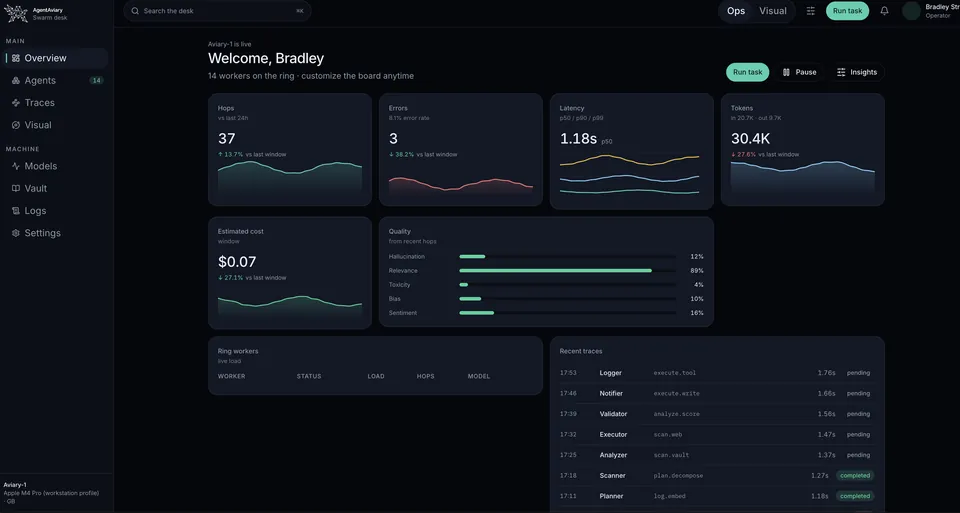
Private clients needed one dashboard for their AI agents. AgentAviary is that dashboard and the harness behind it: agents that take routine work off a small or mid-sized business’s plate, so the team doesn’t have to grow to keep up. Some place automated outbound calls. Others handle back-end management.

It was built from the start to run local, open-source models on the client’s own hardware: the latest flagship open-weight model where it earns its place, smaller models where a task doesn’t need one, chosen per client. I also own the hardware and network side, from a fully sandboxed install that never talks to the outside world to a live setup the client reaches through a custom-developed phone app. They talk to their agents; AgentAviary handles the technical back end.

It started with open source in mind, and I went a different direction. It’s private, so I’m not at liberty to say much more than this.
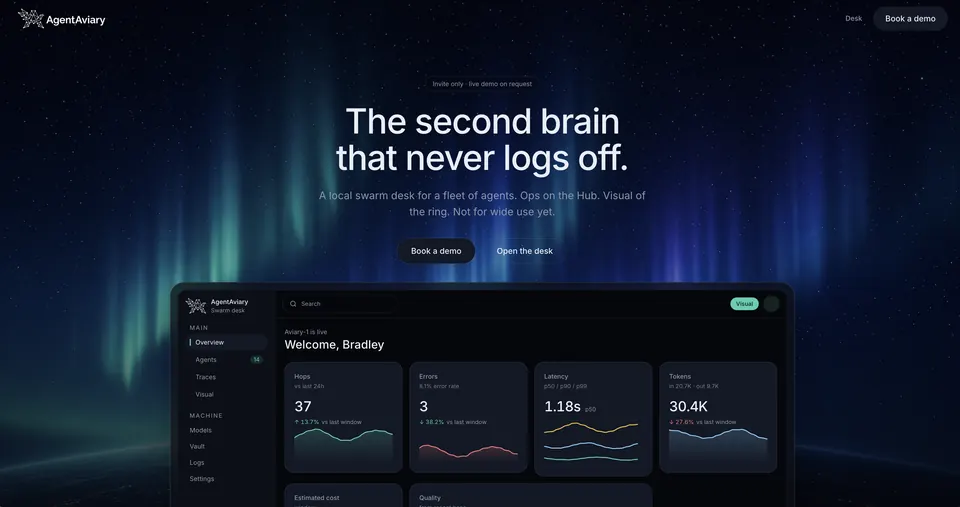
AgentAviary landing page: an aurora night sky behind the headline “The second brain that never logs off,” with the swarm desk previewed below.
  • 2signed clients
  • 3rdcontract in finalization, not yet signed
  • 0client churn across signed accounts
The need
Small and mid-sized businesses with more routine work than people: calls to place, records to keep current, back-office jobs that eat the day. They needed one place to run and watch AI agents doing that work, on hardware they control.
What I built
A responsive React and TypeScript dashboard and the agent harness behind it: task-hop tracing so every step an agent takes is visible, and an interconnected knowledge vault the agents share. Model connections are built around self-hosted open-source models on the client’s own compute, with hosted models like Grok and Claude available alongside.
My part
From the hardware to the roadmap. I work directly in the code, set up the machines and the network, find the requirements, explain what it can do in plain language, manage expectations, and turn real client feedback into improvements to the standard build.
Where it stands
Live with private clients. Closed source, so there’s no public link or repo to share. It works. I’m just not out hunting for new customers: I already have a full-time job, and I like my work-life balance right where it is.
What it taught me
Selling something teaches you as much as building it. Paying clients’ feedback is the best roadmap I’ve had.

Under the hood

Client’s phoneA custom-developed app. They talk to their agents from anywhere; AgentAviary handles the back end.

Sandbox · nothing in, nothing outClient’s hardware · one secure way in

  1. 01
    The client’s teamUses the dashboard on their own network. Nothing reaches out.Uses the dashboard on site, and the phone app everywhere else.
  2. 02
    AgentAviaryReact + TypeScript dashboard · task-hop traces · shared knowledge vault · TanStack server functions keep model API keys on the server, never in the browser.
  3. 03
    Agent harnessGives each agent its job and its tools, routes the work, and records every hop.Outbound callsBack-end managementSized to each client
  4. 04
    ModelsLocal open-source models on the client’s compute: the latest flagship open-weight model where it earns its place, smaller ones where it doesn’t. Hosted models (Grok, Claude) connect alongside when a client wants them.
  5. 05
    Hardware & network · mineA fully sandboxed install: an isolated network with no outside access.A live install: the phone app gets one secure way in, and the models still run on the client’s own hardware.

ReactTypeScriptTanStackLocal open-source modelsAgent harnessGrokClaudeCustom mobile appHardware + networking

Live · Made with love · I saw a need. God gave me the skills. I built it.

Little’s Chapel Baptist Church

I volunteered to help a friend from church with a website. It turned into a real collaboration, from a list of needs to a working site people can find.

Visit littleschapelbaptist.com (opens in a new tab)

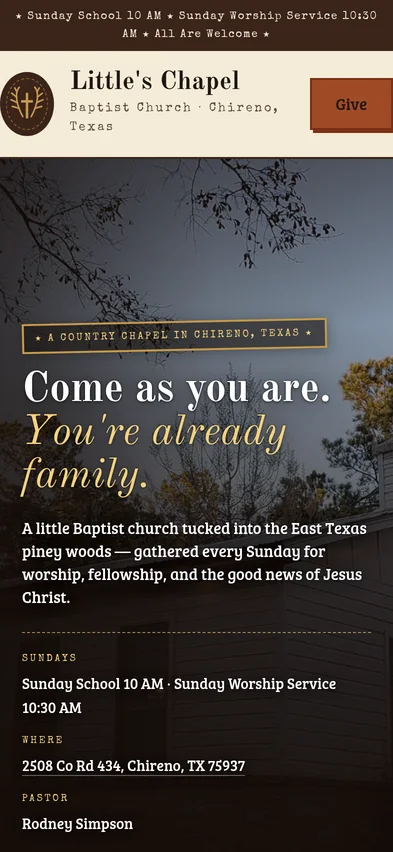
Little’s Chapel homepage on desktop: a cream header with the chapel’s emblem, and a hero photo of the white steeple under bare branches with the headline “Come as you are. You’re already family.”
The same homepage on an iPhone: the service-times banner, the Little’s Chapel header with a Give button, and the steeple photo behind “Come as you are. You’re already family,” then service times, the address and the pastor’s name.
The public site on desktop, and on an iPhone at its real 393 × 852 viewport.
The need
A welcoming front door online for a small country church: who they are, when to come, how to give, and a way for neighbors to find it in local search.
What I built
An original identity and a responsive site. We worked through two design directions together, previewed and iterated, then chose the final concept. Branded Tithe.ly giving is built in.
My part
Hands-on HTML and CSS, JSON-LD structured data, the sitemap, robots.txt and .htaccess, plus Google Search Console and a Google Business Profile. AI helped explore designs; every change got human review before launch.
Where it stands
Live and public at littleschapelbaptist.com since June 2026.
What it taught me
Building with someone, not just for them, is slower at the start and better at the end. Decisions stick when you make them together.
Under the hood
  1. 01

    Structured data

    A schema.org Church in JSON-LD with the name, logo, address and an openingHoursSpecification for Sunday School and worship, so search engines can show service times without guessing.

  2. 02

    Crawl and index

    robots.txt allows everything and points at sitemap.xml, which lists the home and Give pages with dates and priorities. A canonical URL and Open Graph tags keep shared links clean. Search Console and a Google Business Profile handle local search.

  3. 03

    Server

    Plain static HTML and CSS on a LiteSpeed host, with server rules in .htaccess. No CMS, no database and no plugins to keep patched.

  4. 04

    Details

    Branded Tithe.ly giving on its own page, a favicon set from 48 to 192 px plus an Apple touch icon, and layouts checked on desktop and phone before launch.

index.htmllive source, trimmed
<script type="application/ld+json">{  "@context": "https://schema.org",  "@type": "Church",  "name": "Little's Chapel Baptist Church",  "openingHoursSpecification": [    { "name": "Sunday School",      "dayOfWeek": "Sunday",      "opens": "10:00", "closes": "10:30" },    { "name": "Worship Service",      "dayOfWeek": "Sunday",      "opens": "10:30", "closes": "11:30" }  ],  "address": {    "@type": "PostalAddress",    "addressLocality": "Chireno",    "addressRegion": "TX"  }}</script>

HTMLCSSJSON-LDschema.orgsitemap.xmlrobots.txt.htaccessLiteSpeedTithe.lySearch Console

In daily use · Private build · TestFlight invites on request

House of Pi

The Street family’s Raspberry Pi whole-home management app, built for my family. I named it House of Pi.

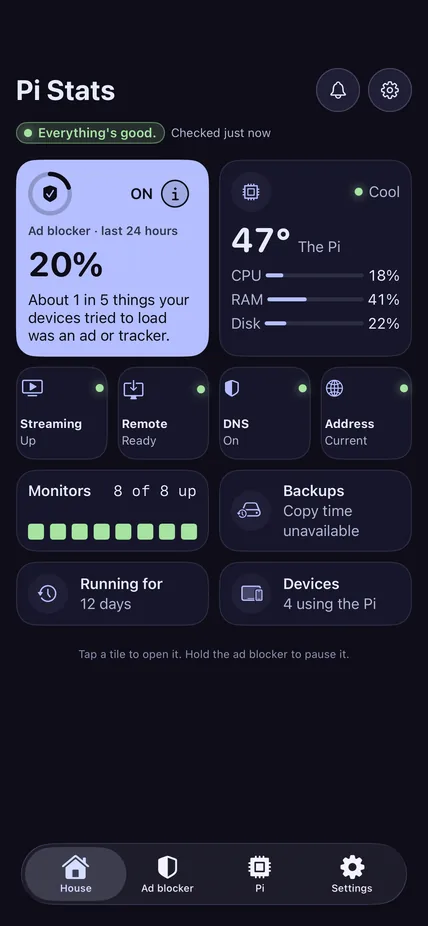
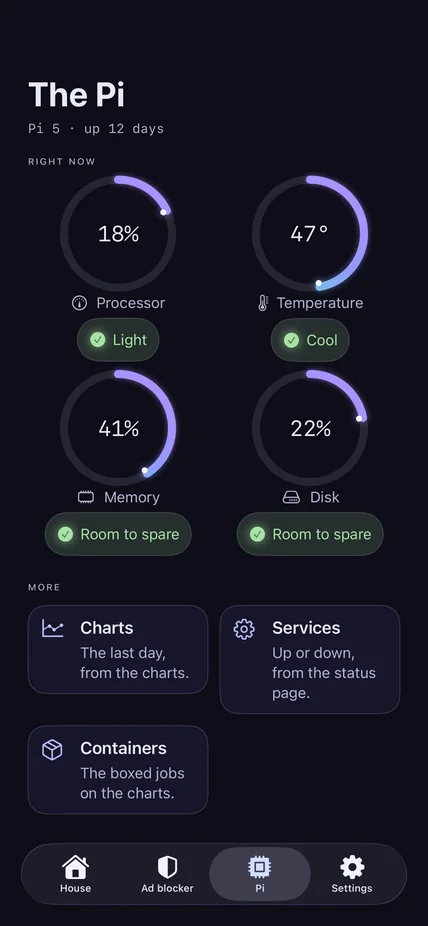
One low-power Raspberry Pi runs the house around the clock: ad blocking and private DNS, the media line, monitoring, remote access, backups and the smart home. A native iPhone and iPad app lets us check on all of it at a glance, in plain English.

The app’s home screen, titled Pi Stats: an “Everything’s good” status, an ad blocker tile, a Pi temperature tile with CPU, RAM and disk bars, and tiles for streaming, remote, DNS, monitors, backups and devices.
The app’s Pi tab: “The Pi, Pi 5, up 12 days,” with four lavender ring gauges for processor at 18 percent, temperature at 47 degrees, memory at 41 percent and disk at 22 percent, each with a plain-English status, then cards for charts, services and containers.
Left: House of Pi on the iPhone, the home screen and the Pi tab. Right: how the app talks to the Pi, at home and away.
The need
One quiet, always-on box that makes the house work better for my family: ad blocking and private DNS, media, monitoring and smart home, plus a safe way to keep an eye on it from the couch or from across town.
What I built
The Pi stack itself, and a native SwiftUI app for iPhone and iPad whose pure-Swift core talks to each service’s REST/JSON API. At home it goes straight to the Pi. Away, it reads a privacy-filtered report and never gets admin.
My part
Reading and changing Swift, SwiftUI and TypeScript, API integration and debugging, Compose and Caddy configuration, DNS query analysis, HTTPS and auth boundary design, CI tests, UI snapshots and checks on real devices. AI sped things up; judgment, review and acceptance stayed mine.
Where it stands
Running at home every day. It’s a private sideloaded build, not an App Store release.
What it taught me
Decide what must never leave the house before you write the code that talks to it. Away mode only shows what’s on the allowlist.
Under the hood
  • DNS and ad blocking

    Pi-hole with Unbound as a recursive resolver, DNSSEC on. The app can only do three things to it: a timed pause, block one domain, allow one domain. Each asks first, in plain English.

  • HTTPS and routing

    Services run as Docker Compose containers behind Caddy, which handles HTTPS and reverse-proxy routing.

  • Monitoring

    Netdata keeps the day charts for processor, temperature, memory and disk. Uptime Kuma checks every service as up, down, pending or maintenance.

  • Remote help

    A self-hosted RustDesk relay for remote desktop, and DuckDNS keeping the house’s address current.

  • The media line

    Requests go in; the Pi collects from multiple sources, downloads automatically, adds metadata, files everything and hands it to playback.

  • Smart home and backups

    Devices from different ecosystems show up together in Apple Home. A weekly backup reports when it last ran and whether it worked.

Swift 6SwiftUITypeScriptCloudflare WorkersDurable ObjectsCloudflare TunnelPi-holeUnboundDocker ComposeCaddyNetdataUptime KumaRustDeskDuckDNSApple HomeGitHub Actions

Live · Free to play, no sign-in needed

Letters with Lucy

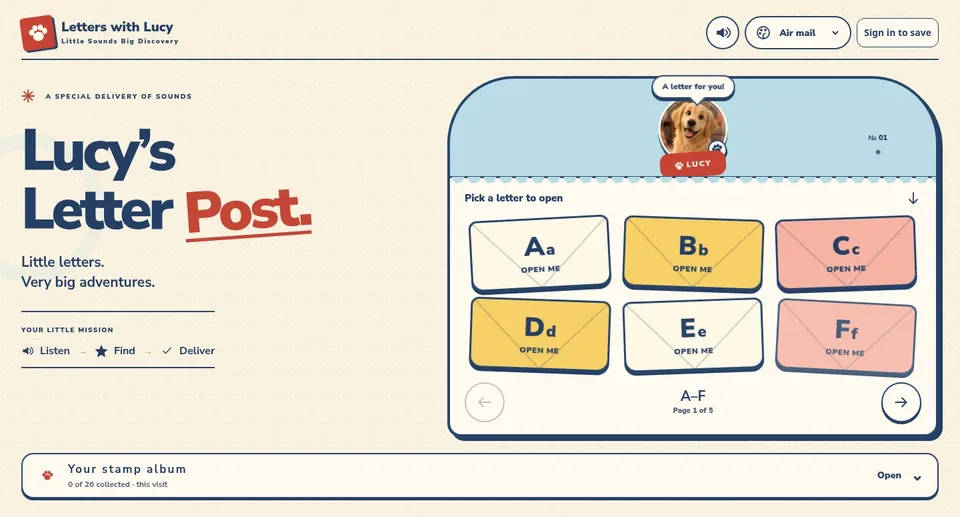
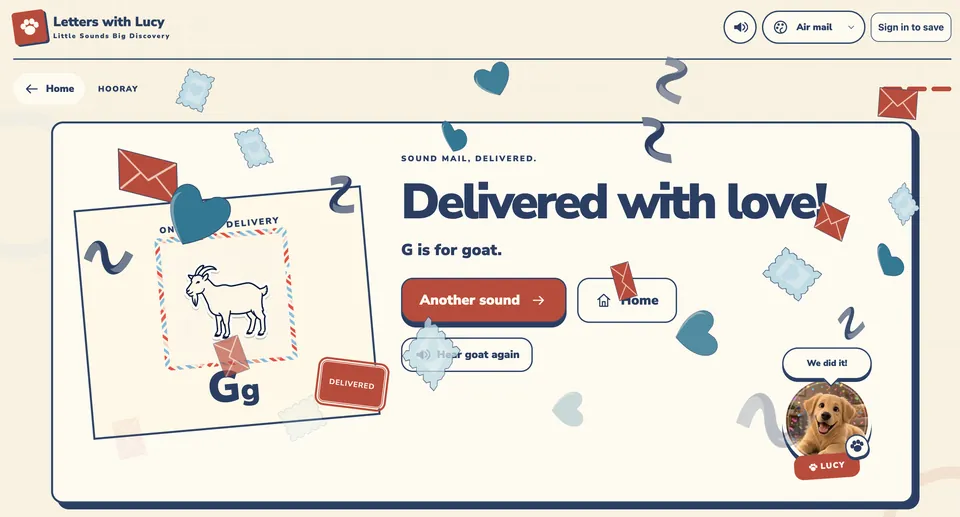
Phonics practice I made for my wife’s classroom. Lucy, a golden retriever, delivers the letters; kids listen, find the match and collect the stamps.

Play Letter Post, no account needed (opens in a new tab)

Right now: Lucy’s Letter Post. Pick an envelope, hear the sound, deliver the match.
The need
My wife, an accomplished teacher at Lufkin ISD and an SFA alum, wanted an engaging way for young learners to practice letter sounds and early reading.
What I built
A playful, offline-capable web app: open an envelope, listen, find the letter, deliver it, and fill a stamp album from A to Z.
My part
Hands-on HTML, CSS and JavaScript, a service worker offline cache, local account storage, and layout reviews across desktop, tablet and phone. I shaped the product decisions and reviewed the AI-assisted work.
Where it stands
Live and free to try. Play mode works without signing in.
What it taught me
When your players can’t read yet, sound and pictures have to carry the instructions. Every word on screen is a bonus, not a requirement.
Under the hood
  1. 01

    No build step

    Plain HTML, CSS and JavaScript split into small scripts for game logic, layout, art, and sound and effects. No framework, no bundler. The word pictures are drawn as SVG in code, so there are no picture files to load.

  2. 02

    Offline, but never stale

    One service worker covers all three game worlds. It precaches a generated file manifest into a versioned cache, asks the network first with cache: 'no-store' so online play always gets the current build, and falls back to the cache when the Wi-Fi drops. Old caches are deleted on activate, and stale tabs reload themselves.

  3. 03

    Sound that teaches

    Every letter has two recorded clips, its name and its sound, plus recorded words and gentle “try again” lines. Small effects are synthesized live with the Web Audio API, like a triangle-wave G–B–D chime for a right answer, and never play over Lucy’s voice. Audio unlocks on the first tap, as browsers require.

  4. 04

    Calm and accessible

    Paper confetti on a right answer. Reduced motion and a grown-up “calm motion” setting behave exactly the same. A skip link, a live-region announcer, and envelopes you can play with a keyboard, six to a page.

  5. 05

    Accounts are optional

    Guest play needs no sign-in. Grown-ups can sign in to save stamps; progress is cached on the device in IndexedDB, and sessions sign out on a safety timer.

sw.jslive source, trimmed
self.addEventListener('fetch', event => {  const url = new URL(event.request.url);  if (event.request.method !== 'GET') return;  if (!files.has(url.href)) return;  event.respondWith((async () => {    // Online loads always ask for the current build;    // installed assets remain offline fallbacks.    try {      const res = await fetch(event.request,        { cache: 'no-store' });      if (res.ok) return res;      return (await caches.match(url.href,        { cacheName: CACHE })) || res;    } catch (error) {      const saved = await caches.match(url.href,        { cacheName: CACHE });      if (saved) return saved;      throw error;    }  })());});

HTMLCSSJavaScriptService WorkerCache StorageWeb Audio APIInline SVGIndexedDBARIA live regions

Live · Public repo

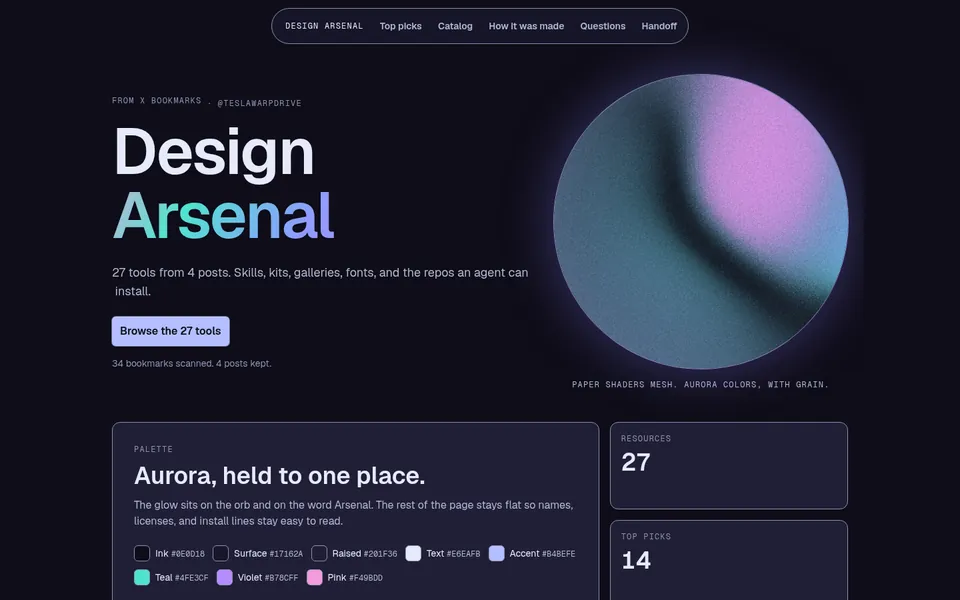
Design Arsenal

A curated kit of design resources I hand to my AI agent, so its visual work starts from taste instead of defaults. Every effect on this page came from it.

See the live guide (opens in a new tab)Read the repo (opens in a new tab)

The Design Arsenal page: the title “Design Arsenal” beside a softly glowing shader orb, a short summary of 27 tools, and palette and count panels.
The live guide, captured in a browser for this page.
The need
An AI agent left to its own devices drifts toward the same generic look. I wanted it working from motion, visuals and patterns I’d chosen, toward a guided outcome, not a pile of prompts.
What I built
I went through 34 saved bookmarks and kept 27 resources across seven categories: agent design skills, UI kits and effects, galleries, fonts and backgrounds. They live on one searchable, filterable page with license notes, copyable install lines and a markdown handoff an agent can read.
My part
The curation, the notes, the page and the handoff format. To be clear, I didn’t author the libraries or reference sites in it; I picked them, checked their licenses and wrote down when each one earns its place.
Where it stands
Live, with a public repo. This site was built using it.
What it taught me
Curating is a skill. The list got more useful every time I cut something from it.
Under the hood
  1. 01

    One self-contained page

    Search, category filters and clipboard copy for install lines, in plain HTML, CSS and JavaScript.

  2. 02

    A shader with manners

    A Paper Shaders mesh orb carries the Aurora palette, with a reduced-motion fallback.

  3. 03

    Agents read it too

    The same catalog ships as a markdown brief, so an agent reads the licenses and usage notes, not just the links.

HTMLCSSJavaScriptPaper ShadersMarkdown handoff

Not every idea needs to become a company. Some of them just need to teach me something.

The lab

Small, odd and unfinished.

Some of these run in my house right now. Some were just a way to find out. They all count.

  • Experiment

    Three worlds, one phonics game

    What it was
    The Letters with Lucy game built three times as separate themed worlds, Letter Post, Moonboat and Silk Thread, all in plain HTML, CSS and JavaScript, sharing one offline service worker.
    What I learned
    Building the same game three ways shows you what the core is: hear a sound, find the letter. Everything else is costume.
  • Earlier build

    An offline alphabet app for Pre-K

    What it was
    My first classroom build: a letter-recognition web app that keeps working offline after the first load.
    What I learned
    In a classroom, offline isn’t a feature. It’s the floor. That lesson became Letters with Lucy’s service worker.
  • Picked one

    Four home screens for one app

    What it was
    Four full layout concepts for House of Pi’s home screen, built side by side. “Control center” won and became the real Home.
    What I learned
    Real options beat descriptions. The three that lost made the winner obvious.
  • Running at home

    The household media line

    What it was
    A pipeline on the Pi: a request goes in, it’s collected from multiple sources, downloaded automatically, tagged with metadata, filed and handed to playback.
    What I learned
    Automation is only as good as its hand-offs. Every step needs a status you can check when something stalls.
  • Running at home

    Apple Home, minus the walls

    What it was
    Getting smart-home devices from different ecosystems to show up together in Apple Home, as part of the Pi setup.
    What I learned
    Integration work lives at the edges: naming, bridges, and what breaks when one side updates.
  • Chose one

    Two directions for one church

    What it was
    Two complete design directions for Little’s Chapel, built so the church could compare real pages instead of sketches.
    What I learned
    Comparing two real options beats arguing about imaginary ones, and the people deciding feel heard.

How I work with AI

AI is a partner, not an employee.

If you only read one section on this site, make it this one.

It helps me think, draft, design and move faster, and it plays a real role in the visual work. It doesn’t replace understanding the code, reviewing every change or owning the result. Treat it like an employee you never check on and you’re on the fast path to failure.

In practice, that means I read what it writes. I review diffs in TypeScript and React, Swift and SwiftUI, HTML, CSS and JavaScript, PHP and SQL, Compose YAML and Caddyfiles. If I can’t explain a change, it doesn’t ship. AI does a lot of the typing. It never does all the thinking.

  1. 01

    Context first

    The files, the types, the failing test, and the rules: where secrets live, what must never leave the house.

  2. 02

    Let it draft

    Code, copy or a design pass, often several side by side on separate git branches or worktrees.

  3. 03

    Read the diff

    Every line, in its own language. Why this query? Why this hook? What did it touch that I didn’t ask for?

  4. 04

    Prove it

    Type checks, tests and CI, snapshot diffs, then real devices: phone, tablet, desktop.

  5. 05

    Own it

    Push back, ask why, re-prompt with the constraint it missed, or rewrite it myself. Merge only what I understand.

src/agent/ask.tsChanges requested
  export async function askAgent(prompt: string) {-   const client = new ModelClient({-     apiKey: import.meta.env.VITE_MODEL_KEY,-   })-   return client.chat(prompt)+   // Keys never reach the browser:+   // the call runs on the server.+   return askAgentOnServer({ data: { prompt } })  }

Bradley · reviewer

Anything prefixed VITE_ is bundled into client JavaScript, so this key would ship to every visitor. Move the model call into a TanStack server function and keep the key in server-side env.

Same rule AgentAviary runs on: TanStack server functions keep model API keys off the browser.
  • Prompts start it. The diff is the work.

    Good results take more than a few prompts. The quality lives in the back and forth: reading what came back, rejecting it, asking why, and trying again with the constraint it missed.

  • Know the languages you approve.

    If I can’t read it, I can’t review it, and if I can’t review it, it doesn’t ship. That’s why the PHP and SQL I learned by hand still matter next to the TypeScript and Swift I review now.

  • Real tools keep me honest.

    Code review on GitHub, Codespaces, git branches and worktrees give every change a place to be checked before it’s trusted. CI does the rest: House of Pi’s Swift core is tested on Linux and its screens against a snapshot matrix on macOS.

  • Guide it technically.

    Learning how AI behaves, and how to steer it, matters as much as the code. I name the architecture before it writes: keys in server functions or the iOS Keychain, an allowlist for the away path, a reduced-motion fallback for every animation.

  • Build with people, not just for them.

    The church site and AgentAviary both got better the moment someone else’s needs were in the room. Feedback is a feature: client requests turn into changes to the standard build.

  • Privacy is a design decision.

    What a thing should never show is easier to decide on day one than to bolt on later: allowlists over blocklists, schemas that reject unknown fields, nothing on the Pi listening to the internet, no analytics on this site.

Stack

Tools I actually use, and where.

No skill percentages. Next to each tool is the project where it shows up, so you can check my work.

Languages and front end

  • TypeScriptAgentAviary · Pi mailbox Worker
  • ReactAgentAviary
  • TanStackAgentAviary server functions
  • Swift + SwiftUIHouse of Pi
  • JavaScriptLetters with Lucy
  • HTMLEvery site I’ve shipped
  • CSSLittle’s Chapel · Lucy · this site
  • PHPWhere it started
  • MySQLWhere it started

The house Pi and the edge

  • Raspberry PiRuns the house, 24/7
  • Docker ComposeEvery service on the Pi
  • CaddyHTTPS · the away gate
  • Pi-hole + UnboundAd blocking · DNSSEC
  • CloudflareWorkers · Tunnel · Access
  • NetdataThe Pi’s day charts
  • Uptime KumaService checks
  • RustDeskSelf-hosted remote desktop
  • Apple HomeSmart home, across ecosystems

Shipping and AI

  • GitBranches and worktrees
  • GitHubCode review · Codespaces
  • GitHub ActionsThe app’s CI
  • XcodeThe app
  • CursorDaily editor
  • ClaudePartner · AgentAviary models
  • CodexPartner, reviewed like the rest
  • ViteThis site
  • Search ConsoleLittle’s Chapel

The résumé part

Where I’ve worked, and what I’ve learned on the clock.

Frontline leadership, a background in technical support and people management, and the building habit running alongside.

Experience

  1. – Present

    Team Leader, Operations

    Etech Global Services (opens in a new tab)

    • Lead a frontline team through daily coaching, clear expectations and accountability.
    • Interpret performance and adherence information to guide coaching conversations and help agents understand what’s expected.
    • Communicate performance topics and team status in plain language with peers and leadership.
    • Maintain customer service standards, manage priorities independently and follow through on team and cross-team needs.
  2. –

    Manager

    Escape Nac

    • Applied people management, clear communication and accountability in a managerial role.
  3. –

    Information Technology Technician

    Sew N Sews · Beaumont, TX

    • Provided technical support and troubleshooting, resolving technology issues and explaining solutions to non-technical users.
  4. –

    Medical Records Technician

    CHI · Lufkin, TX

    • Maintained accurate documentation, protected confidential information and followed defined requirements in a detail-sensitive environment.

Education

  • Angelina CollegeElectronics Technology · 2010–2012
  • Lamar UniversityManagement Information Systems coursework · 2012–2014
  • Google IT Support Professional Certificate
  • Etech trainingAspiring Leader, Mentorship, Epath
  • Etech RU AI coursesEvery course offered, completed with mastery

Tools I use at work

Workplace tools and proficiency
QEvalMastery
CallMinerStrong working knowledge
HubSpotWorking knowledge
LinkedIn Sales NavigatorWorking knowledge
Outlook, Word, ExcelEvery day

Hands-on in my projects

ReactTypeScriptHTML/CSS/JSSwift/SwiftUIREST/JSON APIsCloudflare WorkersDocker ComposeCaddyDNS (Pi-hole, Unbound)Service Workersgit and GitHubPHP/MySQL, where it started

What I bring to a team

Coaching with clear expectations and accountability. Plain-language communication. Setting my own priorities and following through across teams. Customer service that doesn’t cut corners.

Now

What has my attention.

  • Etech Global Services (opens in a new tab)

    My full-time work: leading my team as a Team Leader, with daily coaching, clear expectations and follow-through.

  • AgentAviary

    Turning client feedback into the standard build, and finalizing a third contract.

  • The house Pi

    Keeping it quiet, private and useful, one careful change at a time.

  • Letters with Lucy

    Practice for little readers, shaped around how a classroom actually uses it.

  • This site

    A living home for the next build, the next experiment and the next lesson.

Contact

Say hello.

Email is the best way to reach me. I read everything that isn’t trying to sell me an extended car warranty.

No résumé is complete without these two. I checked.

Bradley standing still on a crosswalk, looking up, while people walk past him in a blur.
Not lost. Just reading the source code of a crosswalk.
Made with Modulify